Deploy GyroidOS on BeagleV-Fire
This section describes how to deploy GyroidOS on the BeagleV-Fire board.
Current pre-built release image:
gyroidosimage-v1.1-beaglev-fire.tar.xz
Create bootable medium
Requirements
- A successfully built GyroidOS image file
gyroidosimage.img. - The script copy_image_to_disk.sh which can be found on GitHub or in your build folder at
gyroidos/build/yocto/copy_image_to_disk.sh - Optional: Bmap file
gyroidosimage.img.bmapwhich is automatically created by the build system and deployed next togyroidosimage.img. This enables flashing using bmaptool.
First, ensure the needed packages are installed on your system.
apt-get install util-linux btrfs-progs sgdisk parted bmap-tools
Copy GyroidOS image to internal eMMC of BeagleV-Fire
Reboot BeagleV-Fire in Hart Software Services (HSS) with eMMC as USB mass storage device on USB type C connector. This can be done by following two steps: - Connect the BeagleV-Fire with its USB type connector to your computer. - Press RESET while USER Button is pressed down and hold
Now the GyroidOS image can be copied to the USB Storage device. The provided script takes care of expanding the partitions to use all of the available disk space.
WARNING: This operation will wipe all data on the target device
sudo copy_image_to_disk.sh <gyroidos-image> </path/to/target/device>
If you have built from source in ws-yocto and your target device is /dev/sde the command would be:
cd ws-yocto # your yocto workspace directory
sudo copy_image_to_disk.sh \
    out-yocto/tmp/deploy/images/beaglev-fire/gyroidos_image/gyroidosimage.img \
    /dev/sde
Boot GyroidOS
Connect a USB2UART-Cable to the Debug port of the BeagleV-Fire board.
See image:
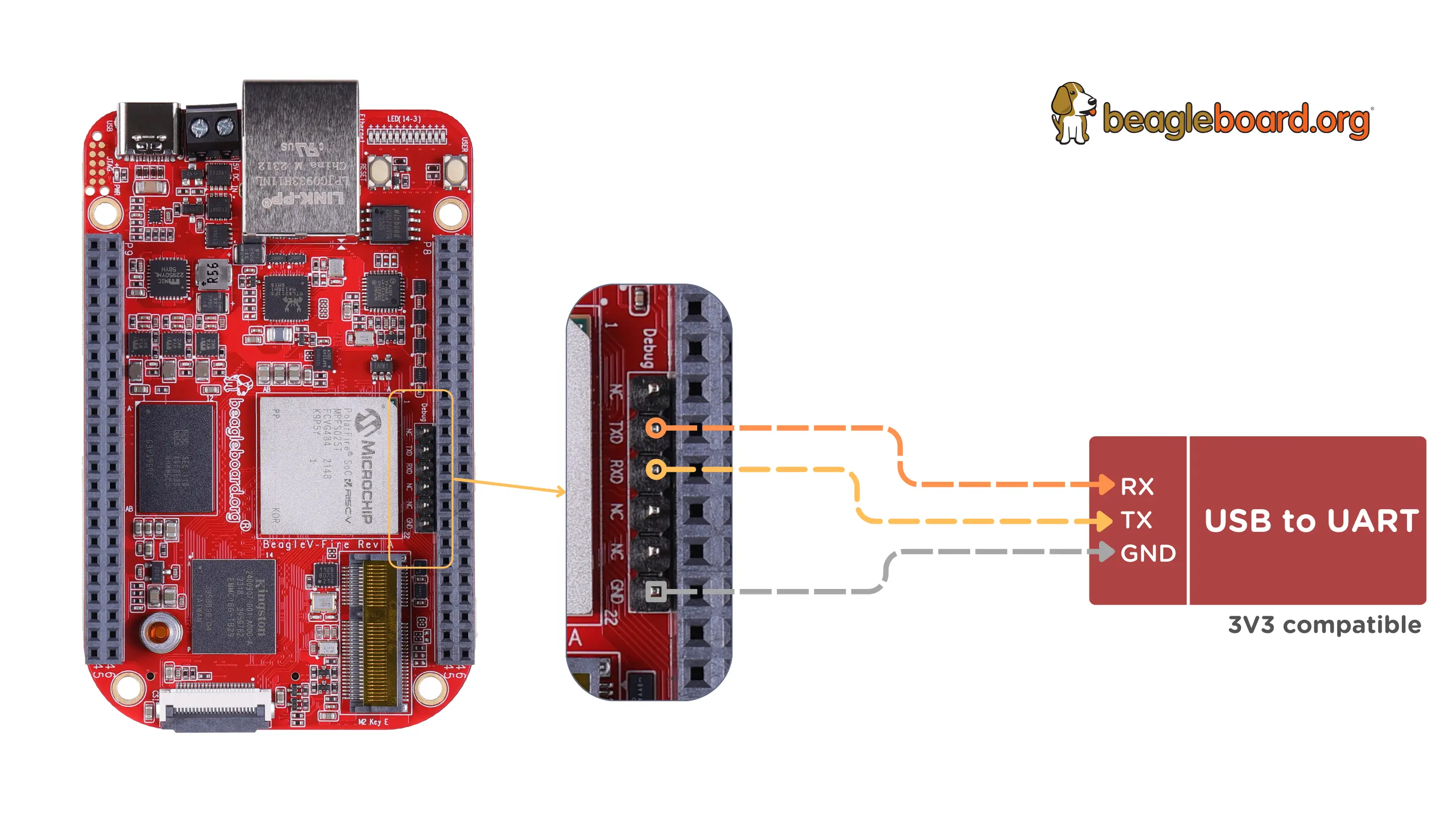
After boot a debug shell into the CML will be available on that serial tty if you have flashed a debug-Image. Further, the init log messages will appear on that serial tty as well as output of the CML services, cmld and scd. The c0 container will be accessible over ethernet by ssh.
For instructions on how to operate GyroidOS please refer to section Operate.